
We Tested a Crazy New Workflow | AI Film News

In this article and video tutorial, we’ll dive into our latest favorite AI filmmaking workflow for motion transfer along with other pieces of AI film news.
We tested a fascinating AI filmmaking workflow had a lot of people talking. In short, it uses depth maps for a more accurate motion transfer in Seedance. The results surprised us and we’re excited to share our findings.
There’s no lack of AI news in the world of AI filmmaking this week. Before we dive too deep in, here are the highlights:
A new depth map workflow for better motion transfer
Free SAM2 Matting application for cleaner rotoscoping
Veed Lip Sync 2.0 API tested
George Lucas embraces AI filmmaking
The Hunt for Gollum will use AI
Reve 2.1 introduces color-controlled image generation
Plus a ton more, so let’s get right to it!
Access the Curious Refuge SAM App
If you are looking to access the SAM App Caleb mentioned in the episode below, you can fill out the formhere to gain access!
A New Workflow for Motion Transfer | AI Film News
Below we breakdown Meta’s new AI tools and other AI Film news from the past week.

Crazy New AI Workflow | AI Film News
Here’s a list of all the AI news from the past few weeks.
1. More Precise Motion Transfer with the Depth Map Workflow
One workflow has been making the rounds across the AI filmmaking community: replacing raw reference footage with a depth map before sending it into Seedance.
Instead of giving Seedance an original reference footage, you first convert the footage into a grayscale depth map.
Original Reference Footage
Depth Map
A depth map is a grayscale representation of a scene that tells AI how far every object is from the camera.
This preserves camera movement and character motion while removing distracting visual information.
The result is often cleaner motion transfer and better adherence to your intended character and environment.
Seedance 2.0 Output with Original Reference Footage + Character and Environment References
Seedance 2.0 Output with Depth Map + Character and Environment References
We tested several different approaches:
Original reference footage found in Artlist
Standard grayscale depth maps via Depth Anything on Fal
Depth maps with OpenPose skeleton overlays via Framethrower.ai
Colorized (character) depth maps via Sam 3 Segment Anything and Compositing inside Premiere Pro
Original Footage
Standard grayscale Depth Map
Colorized Depth Map
Depth Map with Skeleton Pose
After multiple comparisons, one workflow consistently stood out. Surprisingly, the simple black-and-white depth map produced the strongest overall results.
Adding colorized masks or skeleton tracking rarely improved the final generation and may even distract the model.
So if your goal is maximum camera control while keeping the workflow simple, a standard depth map is currently the sweet spot.
2. Free SAM2 Matting App makes rotoscoping much easier
A team put together an open source code for a tool called SAM2 Matting that helps refine rotoscoping outputs.
We figured out how to run the source code via Claude to put together an application that can be run on a Mac and the crazy thing is that it was able to put it together.
Here are our test results against the old version of SAM 2:
The previous version would have given you a video clip that looked like this.
Original Footage Input
Old Version taken directly from SAM2
You can see the edges are just really harsh and it’s not really giving you the detail in the hair.
We ran the original footage inside our application with the new version of SAM2 and got these results:
Raw Footage Transparent Output
Raw Footage Alpha Output
Raw Footage Green Output
For anyone doing AI compositing or visual effects, this tool can save hours of manual masking.
3. Testing Veed Lip Sync 2.0
Veed released their new Lip Sync 2.0 API this week where you could take an original piece of footage and then use audio to replace and match the lip sync.
We put it through several real-world tests with complex multiple shots and movements.
Original Reference Video
Veed Lip Sync 2.0
Overall, the results look pretty good so far for the type of lip-sync capability it has.
5. George Lucas Says AI Is the Future
George Lucas made headlines this week after saying AI simply represents the next stage of filmmaking.
According to Lucas, resisting AI is like insisting the horse and buggy should have defeated the automobile.
It's another sign that industry veterans increasingly view AI as another production tool rather than something separate from filmmaking.
6. The Next Lord of the Rings Film Will Use AI
Andy Serkis in another Variety article confirmed that The Hunt for Gollum will incorporate AI into production.
While he emphasized AI cannot replace the authored performances created through motion capture, he also acknowledged the technology will absolutely play a role in the filmmaking process.
As AI becomes more integrated into professional productions, hybrid workflows continue becoming the industry standard.
7. Reve 2.1 Adds a Unique New Feature
Last time we got our hands on the Reve AI image model, we were impressed with its editing feature that allows you to separate layers similar to Adobe photoshop.
Recently, it released 2.1 with another useful feature: direct color selection.
Instead of describing colors through prompts, you can now assign exact colors during generation.
We tested it against GPT Image 2, Midjourney, and Nano Banana with these hex codes:

Reve 2.1

GPT Image 2.0

Nano Banana 2

Midjourney 8.1
Our takeaway after testing Reve against other leading AI image models::
Reve produced the strongest color accuracy.
GPT Image remained highly realistic but didn't follow the palette as closely.
Midjourney created attractive images but frequently ignored the requested colors.
Nano Banana struggled with realism.
If precise art direction matters, Reve is becoming a very compelling option.
Also, it’s really great to see an independent image model releasing some pretty unique features while being as competitive to the other leading options out there.
8. The Pinterest of AI Prompts
One resource that caught our attention this week is MeiGen.
Think of it as a searchable library of prompts across multiple image and video models.
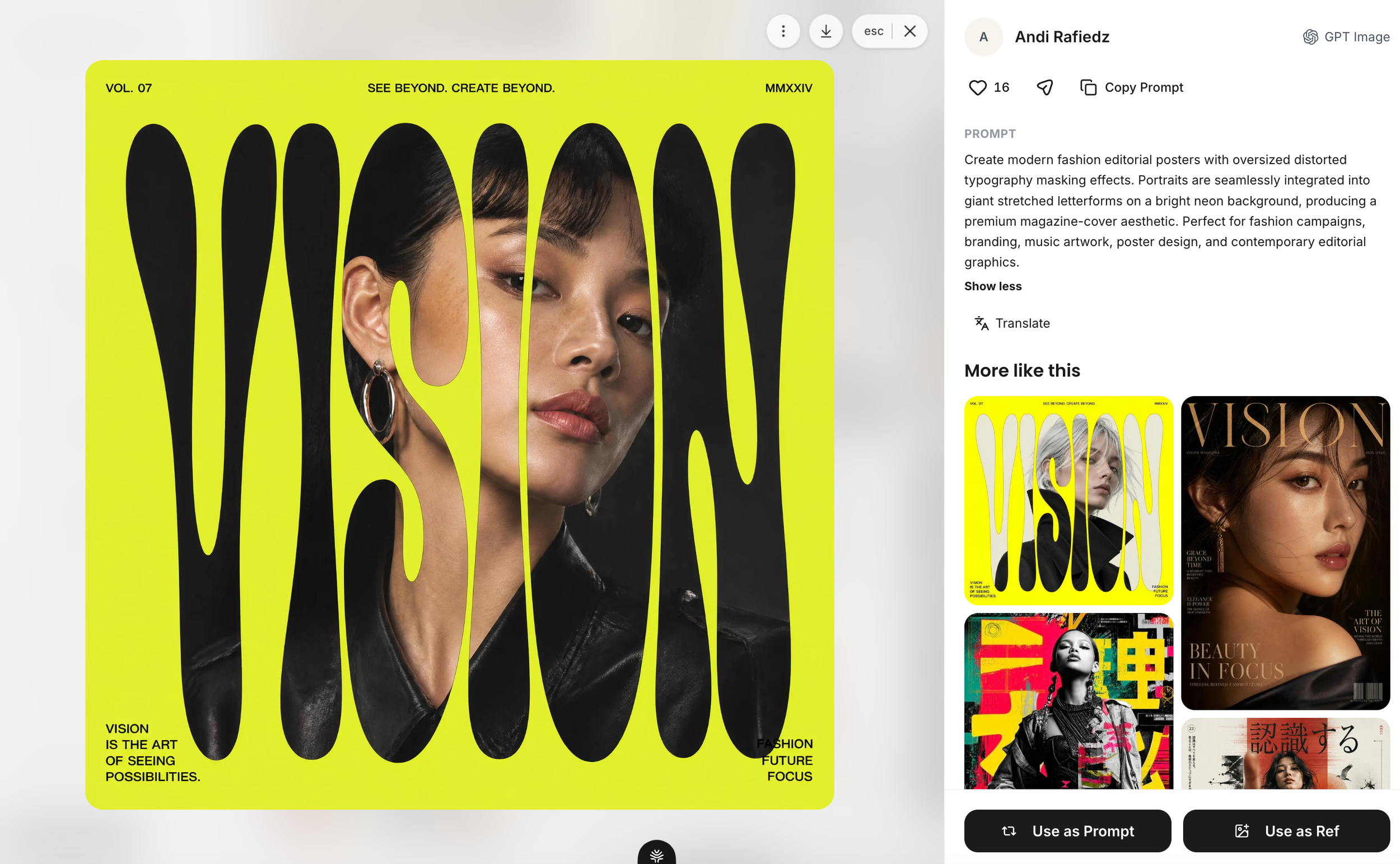
Instead of just browsing inspiration, you can:
copy prompts directly
see which model generated them
study how creators achieved specific looks
It's a useful reference for anyone learning prompt engineering.
9. The Latest Interactive World Models
Three new interactive world models launched this week:
Rather than generating a finished video, these systems generate environments that you can explore in real time.
They're still early, but they point toward a future where filmmakers direct scenes inside fully generative worlds instead of rendering every shot individually.
10. LTX Reframe API Can Expand Frames
The team at LTX released their LTX Reframe API that allows you to upload video footage and change its framing and aspect ratios.
We tested this feature against another tool that already has the ability to do this, Seedance 2.0 Omni.
First, we tried prompting for a portrait to landscape (9:16 to 16:9) aspect ratio change and here are the results:
Original Reference Video
Seedance Omni
LTX Reframe
We also prompted for the reverse, landscape to portrait (16:9 to 9:16) aspect ratio change. Here’s what we got:
Original Reference Video
LTX Reframe
Seedance 2.0 Omni
Across nearly every test, Seedance produced cleaner results with fewer compositing artifacts.
LTX occasionally introduced:
visible seams
warped edges
unexpected objects
If image quality is your priority, Seedance currently has the edge.
What does this AI Film News Mean?
The biggest takeaway from this week's testing wasn't another flashy model release.
It was that simpler workflows often outperform more complicated ones.
Whether it's using standard depth maps instead of elaborate pose pipelines, or relying on AI-assisted rotoscoping rather than manual masking, many of the most practical improvements today come from removing unnecessary steps.
As AI filmmaking matures, the creators who build efficient, repeatable workflows—not just chase the newest models—will likely have the biggest advantage.
If you'd like to stay up to date on the latest AI filmmaking workflows, tools, and tutorials, join the Curious Refuge community and get our free Intro to AI Storytelling course.
We cover the biggest breakthroughs every week so you can spend less time chasing updates and more time creating.
Fill out the form above and get instant access. You also get free access to our global community full of AI creative from all walks of like.
We would love to see you there!
