
7 Powerful Ways to Use Seedance 2 Omni
In this article and video tutorial, we will look at 7 Powerful Ways to Use Seedance 2 Omni in Your AI Films.
Seedance 2.0 is already one of the most powerful AI video tools on the market. But there’s a new feature inside the platform that most creators still aren’t using… and it might completely change how AI filmmakers approach storytelling.
It’s called Seedance Omni.
Instead of just typing a prompt or uploading a single image, Omni allows you to combine multiple references, images, video, and audio to guide the AI toward a much more specific cinematic result.
In this article, we’ll break down 7 powerful ways you can use Seedance Omni right now, based on real-world tests and workflows.
7 Ways to Use Seedance 2 Omni | Video Tutorial
Below is a video tutorial, where we’ll show you how to use Seedance 2.0 Omni and some of our favorite use cases. Enjoy!
7 Ways to Use Seedance 2 Omni
Here’s a deepdive into the best way to utilize Seedance 2 Omni.
1. Advanced Visual Effects
One of the most exciting uses of Seedance Omni is creating cinematic visual effects without using tools like After Effects.
Original
Output
For example, a spacecraft crashing into a reflective salt flat can be generated by combining reference footage with prompts.
This opens the door to:
Sci-fi destruction shots
Explosions and large-scale action
Fantasy environments
Magic and supernatural effects
What’s especially impressive is how Seedance handles motion, physics, and camera movement, which are traditionally the hardest parts of VFX.
For independent creators, this can drastically reduce production time and cost.
2. Character Swapping and Creature Transformations
Character replacement has always been one of the most difficult tasks in AI video. Seedance Omni gets surprisingly close.
Original
Output
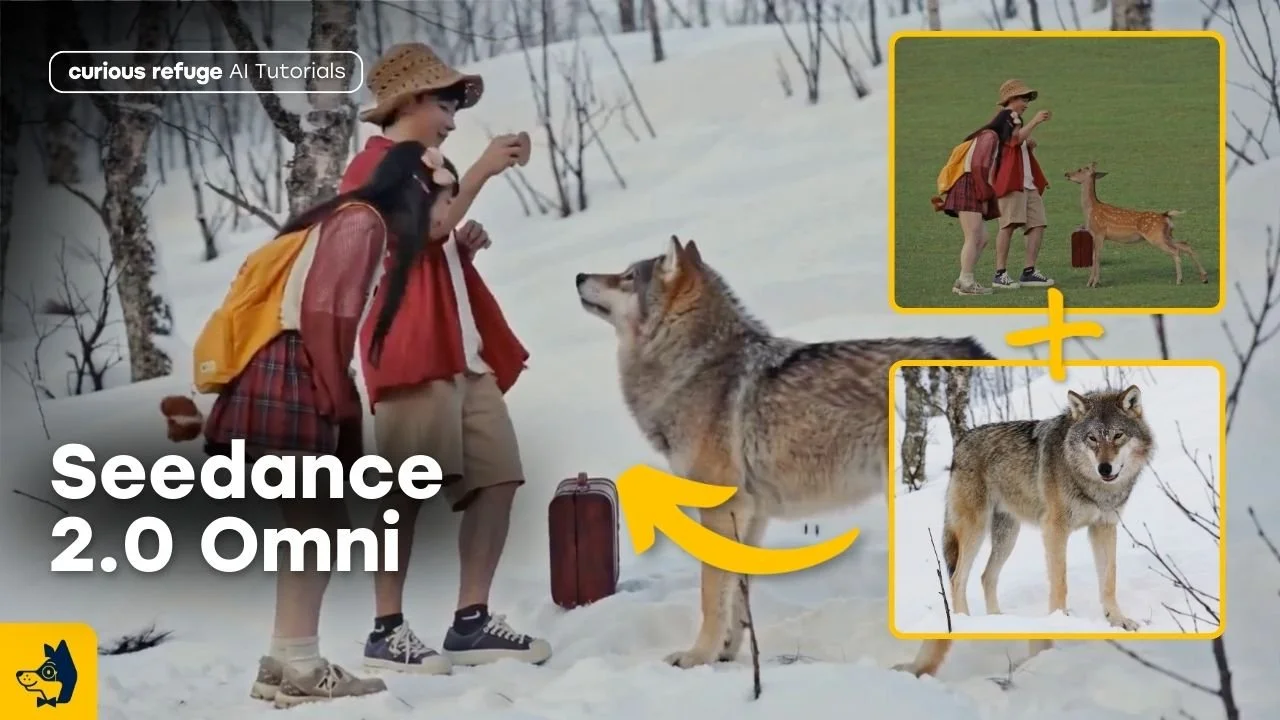
In our tests, we swapped a deer for a wolf, and the scene still maintained the original people, lighting, and environment. While the results weren't perfect, the overall illusion was convincing. This is incredibly useful for:
Creature films
Horror transformations
Fantasy storytelling
Replacing background characters
Even if you still refine shots in post, this feature dramatically speeds up concept development.
3. Weather and Environment Changes
Changing the environment inside an existing shot is another powerful use case. We transformed a calm outdoor scene into a thunderstorm using reference footage and prompts.
Original
Output
While results vary depending on the shot, this workflow allows creators to:
Add rain, snow, or storms
Change time of day
Create dramatic mood shifts
Adjust lighting and atmosphere
This is especially valuable when reshoots aren’t possible. Instead of waiting for perfect conditions, you can modify the environment in post using AI.
4. Historical and Time Period Transformations
One test involved converting a modern city scene into the 1920s. Although the results needed refinement, this demonstrates a powerful direction for AI filmmaking.
Original
Output
Imagine:
Turning modern footage into period films
Creating alternate timelines
Building historical documentaries
Rapidly testing production design
As these models improve, this could become one of the biggest disruptions in filmmaking.
5. Adding in Large Scale VFX
Seedance Omni excels at adding elements that feel grounded in the world.
Original
Output
In the tutorial, a dragon was added flying through a city skyline, and the tracking and lighting made it feel integrated into the shot.
This workflow works especially well for:
Epic fantasy
Superhero films
Creature and monster content
YouTube and social storytelling
Music videos
Because the AI understands motion and perspective, these shots often feel far more cinematic than traditional image-to-video workflows.
6. Creative Style and Tone Shifts
Another fun example involved turning asteroids into meatballs, demonstrating how Omni can shift tone and genre.
Original
Output
This might sound silly, but it highlights something powerful: you can rapidly experiment with different moods and styles.
This allows filmmakers to test ideas quickly before committing to a final direction. Think of it as creative sandboxing.
7. Multi-Character Lip Sync
This may be the most transformative use case. Lip syncing has always been one of the biggest bottlenecks in AI filmmaking.
But Seedance Omni allows creators to upload audio and generate performances across multiple characters.
In our tests:
A close-up character was synced to dialogue
A wide shot with two characters automatically handled speaking turns
Performance and camera movement remained cinematic
As this technology improves, it could fundamentally change how AI films are produced.
Free Intro to AI Storytelling Course
If you've ever wanted to launch an AI film project from scratch using easy-to-use tools, check out our online courses. We show you how to test and launch a thriving modern project using the latest techniques.
Fill out the form above to get started learning some of the latest workflows for creating AI projects.
Best of luck on all your creative projects!
